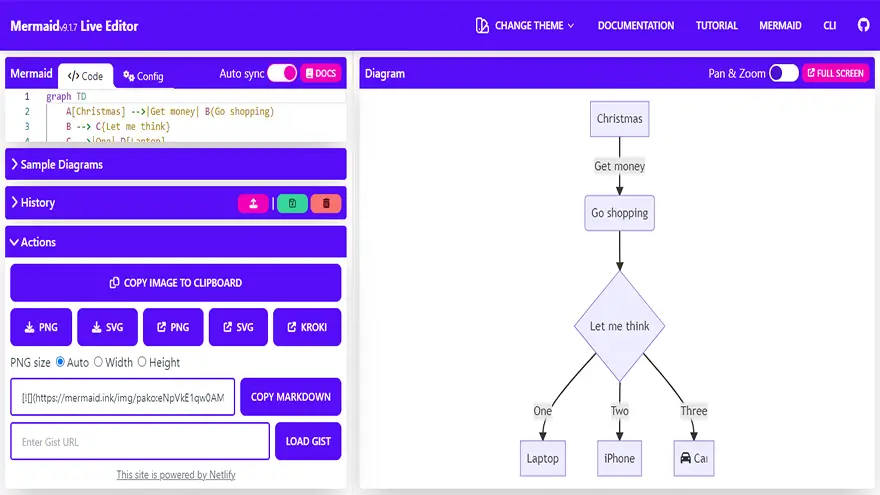
Mermaid Live Editor is an online tool that allows us to create, edit, preview, and share Mermaid diagrams/charts. It is a live editor, so you will see the output in real-time. Mermaid Live Editor is an open-source tool that makes it completely free to use for personal or commercial projects.
Basically, Mermaid Editor was created to help you quickly draw flowcharts and Gantt charts.
There are many platforms and tools that support Mermaid out of the box. Most of them either have native support for Mermaid or allow integration by means of plugins, extensions, etc. They are great in their respective use cases, but if you are looking for a free online Mermaid diagram editor to quickly render and save a Mermaid diagram, the Mermaid Live Editor will be the preferred choice.
Today, I’ll teach you about the different features of this editor and how to use them.
After reading this guide, you will be ready to start creating diagrams in Mermaid Live Editor.
docker run --publish 8000:80 ghcr.io/mermaid-js/mermaid-live-editor
When building, Set the Environment variable MERMAID_RENDERER_URL to the rendering service. Default is https://mermaid.ink
When building, Set the Environment variable MERMAID_KROKI_RENDERER_URL to your Kroki instance. Default is https://kroki.io
docker compose up --build
Then open http://localhost:8000
Volta is used for managing node and yarn versions.
This project is set up using Yarn:
yarn install
yarn dev -- --open
This app is created with Svelte Kit.
When a PR is created targeting master, it will be built and deployed by Netlify. The URL will be indicated in a Comment in the PR.
Once the PR is merged, it will automatically be released.
If you have been searching for the right note-taking or knowledge management app, you have…
Looking for AnyType alternatives? You're not alone. AnyType has gained popularity as a privacy-focused, local-first…
Notion is a popular all-in-one workspace, but many users seek alternatives for different needs (free…
Logseq is a beloved tool in the personal knowledge management (PKM) community. It's free, open-source,…
Looking for a Webshare alternative? You're not alone. Webshare is a popular proxy service with…
Docker changed software development forever. It made containers accessible, gave developers a simple workflow, and…
