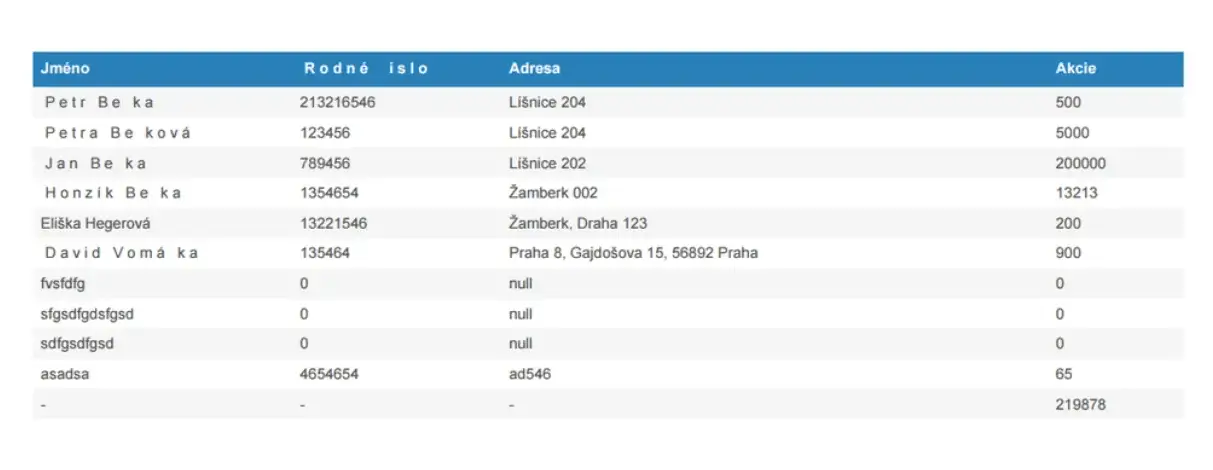
After the release of version 1.4.0, the jsPDF finally supports encoding diacritics characters, but in a very strange way, in my opinion.
C:\Windows\Fonts\Calibri and copy a .ttf font file to Desktop.import { jsPDF } from "jspdf"
var font = 'AAEAAAAWAQQAAB...==';
var callAddFont = function () {
this.addFileToVFS('calibri-normal.ttf', font);
this.addFont('calibri-normal.ttf', 'calibri', 'normal');
};
jsPDF.API.events.push(['addFonts', callAddFont]);The second string in this.addFont('calibri-normal.ttf', 'calibri', 'normal'); will be the name of your font. Remember it.
import '../utils/calibri-normal';jsPDF object and set your font up:<span class="hljs-keyword">const</span> doc = <span class="hljs-keyword">new</span> <span class="hljs-title function_">jsPDF</span>(<span class="hljs-string">'p'</span>, <span class="hljs-string">'pt'</span>, <span class="hljs-string">'a4'</span>); doc.<span class="hljs-title function_">setFont</span>(<span class="hljs-string">"calibri"</span>); <span class="hljs-comment">// <-- place here your font name, which you remeber before</span> <span class="hljs-comment">//...</span> doc.<span class="hljs-title function_">save</span>(<span class="hljs-string">'file001.pdf'</span>);
doc.<span class="hljs-title function_">autoTable</span>({
    <span class="hljs-attr">head</span>: [[<span class="hljs-string">'Column1'</span>, <span class="hljs-string">'Column2'</span>, <span class="hljs-string">'Column3'</span>]],
    <span class="hljs-attr">body</span>: someDataRows,
    <span class="hljs-attr">styles</span>: {
      <span class="hljs-attr">font</span>: <span class="hljs-string">'calibri'</span>,    <span class="hljs-comment">// <-- place name of your font here</span>
      <span class="hljs-attr">fontStyle</span>: <span class="hljs-string">'normal'</span>,
    },
    <span class="hljs-attr">margin</span>: { <span class="hljs-attr">bottom</span>: <span class="hljs-number">60</span> }
});If you have been searching for the right note-taking or knowledge management app, you have…
Looking for AnyType alternatives? You're not alone. AnyType has gained popularity as a privacy-focused, local-first…
Notion is a popular all-in-one workspace, but many users seek alternatives for different needs (free…
Logseq is a beloved tool in the personal knowledge management (PKM) community. It's free, open-source,…
Looking for a Webshare alternative? You're not alone. Webshare is a popular proxy service with…
Docker changed software development forever. It made containers accessible, gave developers a simple workflow, and…
