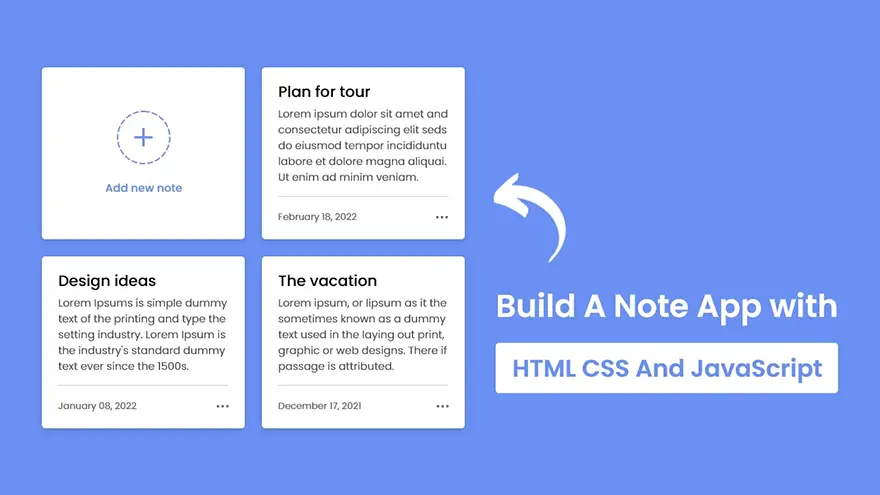
In this tutorial, I will teach you how to create a Notes app using HTML5, CSS3, and JavaScript. The complete source code of this JavaScript Notes app is given below.
<!DOCTYPE html>
<html lang="en" dir="ltr">
  <head>
    <meta charset="utf-8">
    <title>Notes App in JavaScript</title>
    <link rel="stylesheet" href="style.css">
    <meta name="viewport" content="width=device-width, initial-scale=1.0">
    <!-- Iconscout Link For Icons -->
    <link rel="stylesheet" href="https://unicons.iconscout.com/release/v4.0.0/css/line.css">
  </head>
  <body>
    <div class="popup-box">
      <div class="popup">
        <div class="content">
          <header>
            <p></p>
            <i class="uil uil-times"></i>
          </header>
          <form action="#">
            <div class="row title">
              <label>Title</label>
              <input type="text" spellcheck="false">
            </div>
            <div class="row description">
              <label>Description</label>
              <textarea spellcheck="false"></textarea>
            </div>
            <button></button>
          </form>
        </div>
      </div>
    </div>
    <div class="wrapper">
      <li class="add-box">
        <div class="icon"><i class="uil uil-plus"></i></div>
        <p>Add new note</p>
      </li>
    </div>

    <script src="script.js"></script>

  </body>
</html>const addBox = document.querySelector(".add-box"),
popupBox = document.querySelector(".popup-box"),
popupTitle = popupBox.querySelector("header p"),
closeIcon = popupBox.querySelector("header i"),
titleTag = popupBox.querySelector("input"),
descTag = popupBox.querySelector("textarea"),
addBtn = popupBox.querySelector("button");
const months = ["January", "February", "March", "April", "May", "June", "July",
"August", "September", "October", "November", "December"];
const notes = JSON.parse(localStorage.getItem("notes") || "[]");
let isUpdate = false, updateId;
addBox.addEventListener("click", () => {
popupTitle.innerText = "Add a new Note";
addBtn.innerText = "Add Note";
popupBox.classList.add("show");
document.querySelector("body").style.overflow = "hidden";
if(window.innerWidth > 660) titleTag.focus();
});
closeIcon.addEventListener("click", () => {
isUpdate = false;
titleTag.value = descTag.value = "";
popupBox.classList.remove("show");
document.querySelector("body").style.overflow = "auto";
});
function showNotes() {
if(!notes) return;
document.querySelectorAll(".note").forEach(li => li.remove());
notes.forEach((note, id) => {
let filterDesc = note.description.replaceAll("\n", '<br/>');
let liTag = `<li class="note">
<div class="details">
<p>${note.title}</p>
<span>${filterDesc}</span>
</div>
<div class="bottom-content">
<span>${note.date}</span>
<div class="settings">
<i >/* Import Google Font - Poppins */@import url('https://fonts.googleapis.com/css2?family=Poppins:wght@400;500;600;700&display=swap');
*{
margin: 0;
padding: 0;
box-sizing: border-box;
font-family: 'Poppins', sans-serif;
}
body{
background: #88ABFF;
}
::selection{
color: #fff;
background: #618cf8;
}
.wrapper{
margin: 50px;
display: grid;
gap: 25px;
grid-template-columns: repeat(auto-fill, 265px);
}
.wrapper li{
height: 250px;
list-style: none;
border-radius: 5px;
padding: 15px 20px 20px;
background: #fff;
box-shadow: 0 4px 8px rgba(0,0,0,0.05);
}
.add-box, .icon, .bottom-content,
.popup, header, .settings .menu li{
display: flex;
align-items: center;
justify-content: space-between;
}
.add-box{
cursor: pointer;
flex-direction: column;
justify-content: center;
}
.add-box .icon{
height: 78px;
width: 78px;
color: #88ABFF;
font-size: 40px;
border-radius: 50%;
justify-content: center;
border: 2px dashed #88ABFF;
}
.add-box p{
color: #88ABFF;
font-weight: 500;
margin-top: 20px;
}
.note{
display: flex;
flex-direction: column;
justify-content: space-between;
}
.note .details{
max-height: 165px;
overflow-y: auto;
}
.note .details::-webkit-scrollbar,
.popup textarea::-webkit-scrollbar{
width: 0;
}
.note .details:hover::-webkit-scrollbar,
.popup textarea:hover::-webkit-scrollbar{
width: 5px;
}
.note .details:hover::-webkit-scrollbar-track,
.popup textarea:hover::-webkit-scrollbar-track{
background: #f1f1f1;
border-radius: 25px;
}
.note .details:hover::-webkit-scrollbar-thumb,
.popup textarea:hover::-webkit-scrollbar-thumb{
background: #e6e6e6;
border-radius: 25px;
}
.note p{
font-size: 22px;
font-weight: 500;
}
.note span{
display: block;
color: #575757;
font-size: 16px;
margin-top: 5px;
}
.note .bottom-content{
padding-top: 10px;
border-top: 1px solid #ccc;
}
.bottom-content span{
color: #6D6D6D;
font-size: 14px;
}
.bottom-content .settings{
position: relative;
}
.bottom-content .settings i{
color: #6D6D6D;
cursor: pointer;
font-size: 15px;
}
.settings .menu{
z-index: 1;
bottom: 0;
right: -5px;
padding: 5px 0;
background: #fff;
position: absolute;
border-radius: 4px;
transform: scale(0);
transform-origin: bottom right;
box-shadow: 0 0 6px rgba(0,0,0,0.15);
transition: transform 0.2s ease;
}
.settings.show .menu{
transform: scale(1);
}
.settings .menu li{
height: 25px;
font-size: 16px;
margin-bottom: 2px;
padding: 17px 15px;
cursor: pointer;
box-shadow: none;
border-radius: 0;
justify-content: flex-start;
}
.menu li:last-child{
margin-bottom: 0;
}
.menu li:hover{
background: #f5f5f5;
}
.menu li i{
padding-right: 8px;
}
.popup-box{
position: fixed;
top: 0;
left: 0;
z-index: 2;
height: 100%;
width: 100%;
background: rgba(0,0,0,0.4);
}
.popup-box .popup{
position: absolute;
top: 50%;
left: 50%;
z-index: 3;
width: 100%;
max-width: 400px;
justify-content: center;
transform: translate(-50%, -50%) scale(0.95);
}
.popup-box, .popup{
opacity: 0;
pointer-events: none;
transition: all 0.25s ease;
}
.popup-box.show, .popup-box.show .popup{
opacity: 1;
pointer-events: auto;
}
.popup-box.show .popup{
transform: translate(-50%, -50%) scale(1);
}
.popup .content{
border-radius: 5px;
background: #fff;
width: calc(100% - 15px);
box-shadow: 0 0 15px rgba(0,0,0,0.1);
}
.content header{
padding: 15px 25px;
border-bottom: 1px solid #ccc;
}
.content header p{
font-size: 20px;
font-weight: 500;
}
.content header i{
color: #8b8989;
cursor: pointer;
font-size: 23px;
}
.content form{
margin: 15px 25px 35px;
}
.content form .row{
margin-bottom: 20px;
}
form .row label{
font-size: 18px;
display: block;
margin-bottom: 6px;
}
form :where(input, textarea){
height: 50px;
width: 100%;
outline: none;
font-size: 17px;
padding: 0 15px;
border-radius: 4px;
border: 1px solid #999;
}
form :where(input, textarea):focus{
box-shadow: 0 2px 4px rgba(0,0,0,0.11);
}
form .row textarea{
height: 150px;
resize: none;
padding: 8px 15px;
}
form button{
width: 100%;
height: 50px;
color: #fff;
outline: none;
border: none;
cursor: pointer;
font-size: 17px;
border-radius: 4px;
background: #6A93F8;
}
@media (max-width: 660px){
.wrapper{
margin: 15px;
gap: 15px;
grid-template-columns: repeat(auto-fill, 100%);
}
.popup-box .popup{
max-width: calc(100% - 15px);
}
.bottom-content .settings i{
font-size: 17px;
}
}If you have been searching for the right note-taking or knowledge management app, you have…
Looking for AnyType alternatives? You're not alone. AnyType has gained popularity as a privacy-focused, local-first…
Notion is a popular all-in-one workspace, but many users seek alternatives for different needs (free…
Logseq is a beloved tool in the personal knowledge management (PKM) community. It's free, open-source,…
Looking for a Webshare alternative? You're not alone. Webshare is a popular proxy service with…
Docker changed software development forever. It made containers accessible, gave developers a simple workflow, and…
