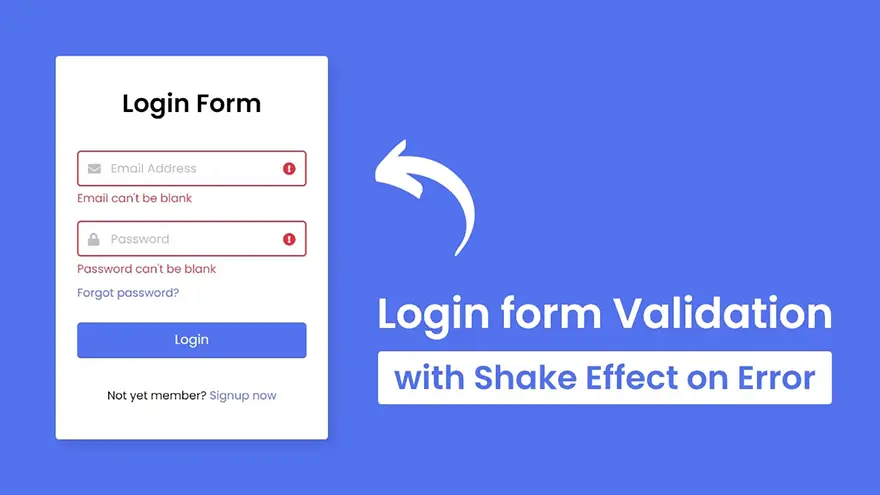
In this tutorial, I will teach you how to do Login Form Validation using HTML5, CSS3, and JavaScript. We will also use some animations (like the shake effect) while displaying the errors to improve the design. The complete source code of this Login Form Validation project is given below.
<!DOCTYPE html>
<html lang="en">
<head>
  <meta charset="UTF-8">
  <meta name="viewport" content="width=device-width, initial-scale=1.0">
  <title>Login Form with Shake Effect</title>
  <link rel="stylesheet" href="style.css">
  <link rel="stylesheet" href="https://cdnjs.cloudflare.com/ajax/libs/font-awesome/5.15.3/css/all.min.css"/>
</head>
<body>
  <div class="wrapper">
    <header>Login Form</header>
    <form action="#">
      <div class="field email">
        <div class="input-area">
          <input type="text" placeholder="Email Address">
          <i class="icon fas fa-envelope"></i>
          <i class="error error-icon fas fa-exclamation-circle"></i>
        </div>
        <div class="error error-txt">Email can't be blank</div>
      </div>
      <div class="field password">
        <div class="input-area">
          <input type="password" placeholder="Password">
          <i class="icon fas fa-lock"></i>
          <i class="error error-icon fas fa-exclamation-circle"></i>
        </div>
        <div class="error error-txt">Password can't be blank</div>
      </div>
      <div class="pass-txt"><a href="#">Forgot password?</a></div>
      <input type="submit" value="Login">
    </form>
    <div class="sign-txt">Not yet member? <a href="#">Signup now</a></div>
  </div>

  <script src="script.js"></script>

</body>
</html>
const form = document.querySelector("form");
eField = form.querySelector(".email"),
eInput = eField.querySelector("input"),
pField = form.querySelector(".password"),
pInput = pField.querySelector("input");

form.onsubmit = (e)=>{
  e.preventDefault(); //preventing from form submitting
  //if email and password is blank then add shake class in it else call specified function
  (eInput.value == "") ? eField.classList.add("shake", "error") : checkEmail();
  (pInput.value == "") ? pField.classList.add("shake", "error") : checkPass();

  setTimeout(()=>{ //remove shake class after 500ms
    eField.classList.remove("shake");
    pField.classList.remove("shake");
  }, 500);

  eInput.onkeyup = ()=>{checkEmail();} //calling checkEmail function on email input keyup
  pInput.onkeyup = ()=>{checkPass();} //calling checkPassword function on pass input keyup

  function checkEmail(){ //checkEmail function
    let pattern = /^[^ ]+@[^ ]+\.[a-z]{2,3}$/; //pattern for validate email
    if(!eInput.value.match(pattern)){ //if pattern not matched then add error and remove valid class
      eField.classList.add("error");
      eField.classList.remove("valid");
      let errorTxt = eField.querySelector(".error-txt");
      //if email value is not empty then show please enter valid email else show Email can't be blank
      (eInput.value != "") ? errorTxt.innerText = "Enter a valid email address" : errorTxt.innerText = "Email can't be blank";
    }else{ //if pattern matched then remove error and add valid class
      eField.classList.remove("error");
      eField.classList.add("valid");
    }
  }

  function checkPass(){ //checkPass function
    if(pInput.value == ""){ //if pass is empty then add error and remove valid class
      pField.classList.add("error");
      pField.classList.remove("valid");
    }else{ //if pass is empty then remove error and add valid class
      pField.classList.remove("error");
      pField.classList.add("valid");
    }
  }

  //if eField and pField doesn't contains error class that mean user filled details properly
  if(!eField.classList.contains("error") && !pField.classList.contains("error")){
    window.location.href = form.getAttribute("action"); //redirecting user to the specified url which is inside action attribute of form tag
  }
}
@import url('https://fonts.googleapis.com/css2?family=Poppins:wght@400;500;600&display=swap');
*{
  margin: 0;
  padding: 0;
  box-sizing: border-box;
  font-family: "Poppins", sans-serif;
}
body{
  width: 100%;
  height: 100vh;
  display: flex;
  align-items: center;
  justify-content: center;
  background: #5372F0;
}
::selection{
  color: #fff;
  background: #5372F0;
}
.wrapper{
  width: 380px;
  padding: 40px 30px 50px 30px;
  background: #fff;
  border-radius: 5px;
  text-align: center;
  box-shadow: 10px 10px 15px rgba(0,0,0,0.1);
}
.wrapper header{
  font-size: 35px;
  font-weight: 600;
}
.wrapper form{
  margin: 40px 0;
}
form .field{
  width: 100%;
  margin-bottom: 20px;
}
form .field.shake{
  animation: shake 0.3s ease-in-out;
}
@keyframes shake {
  0%, 100%{
    margin-left: 0px;
  }
  20%, 80%{
    margin-left: -12px;
  }
  40%, 60%{
    margin-left: 12px;
  }
}
form .field .input-area{
  height: 50px;
  width: 100%;
  position: relative;
}
form input{
  width: 100%;
  height: 100%;
  outline: none;
  padding: 0 45px;
  font-size: 18px;
  background: none;
  caret-color: #5372F0;
  border-radius: 5px;
  border: 1px solid #bfbfbf;
  border-bottom-width: 2px;
  transition: all 0.2s ease;
}
form .field input:focus,
form .field.valid input{
  border-color: #5372F0;
}
form .field.shake input,
form .field.error input{
  border-color: #dc3545;
}
.field .input-area i{
  position: absolute;
  top: 50%;
  font-size: 18px;
  pointer-events: none;
  transform: translateY(-50%);
}
.input-area .icon{
  left: 15px;
  color: #bfbfbf;
  transition: color 0.2s ease;
}
.input-area .error-icon{
  right: 15px;
  color: #dc3545;
}
form input:focus ~ .icon,
form .field.valid .icon{
  color: #5372F0;
}
form .field.shake input:focus ~ .icon,
form .field.error input:focus ~ .icon{
  color: #bfbfbf;
}
form input::placeholder{
  color: #bfbfbf;
  font-size: 17px;
}
form .field .error-txt{
  color: #dc3545;
  text-align: left;
  margin-top: 5px;
}
form .field .error{
  display: none;
}
form .field.shake .error,
form .field.error .error{
  display: block;
}
form .pass-txt{
  text-align: left;
  margin-top: -10px;
}
.wrapper a{
  color: #5372F0;
  text-decoration: none;
}
.wrapper a:hover{
  text-decoration: underline;
}
form input[type="submit"]{
  height: 50px;
  margin-top: 30px;
  color: #fff;
  padding: 0;
  border: none;
  background: #5372F0;
  cursor: pointer;
  border-bottom: 2px solid rgba(0,0,0,0.1);
  transition: all 0.3s ease;
}
form input[type="submit"]:hover{
  background: #2c52ed;
}
If you have been searching for the right note-taking or knowledge management app, you have…
Looking for AnyType alternatives? You're not alone. AnyType has gained popularity as a privacy-focused, local-first…
Notion is a popular all-in-one workspace, but many users seek alternatives for different needs (free…
Logseq is a beloved tool in the personal knowledge management (PKM) community. It's free, open-source,…
Looking for a Webshare alternative? You're not alone. Webshare is a popular proxy service with…
Docker changed software development forever. It made containers accessible, gave developers a simple workflow, and…
