npx create-react-app weatherapp
cd weatherapp
npm i bootstrap
App.js
import React from "react";

import Titles from "./components/Titles";
import Form from "./components/Form";
import Weather from "./components/Weather";

const API_KEY = "###yourapikey###;

class App extends React.Component {
  state = {
    temperature: undefined,
    city: undefined,
    country: undefined,
    humidity: undefined,
    description: undefined,
    error: undefined
  }
  getWeather = async (e) => {
    e.preventDefault();
    const city = e.target.elements.city.value;
    const country = e.target.elements.country.value;
    const api_call = await fetch(`http://api.openweathermap.org/data/2.5/weather?q=${city},${country}&appid=${API_KEY}&units=metric`);
    const data = await api_call.json();
    if (city && country) {
      this.setState({
        temperature: data.main.temp,
        city: data.name,
        country: data.sys.country,
        humidity: data.main.humidity,
        description: data.weather[0].description,
        error: ""
      });
    } else {
      this.setState({
        temperature: undefined,
        city: undefined,
        country: undefined,
        humidity: undefined,
        description: undefined,
        error: "Please enter the values."
      });
    }
  }
  render() {
    return (
      <div>
        <div className="wrapper">
          <div className="main">
            <div className="container">
              <div className="row">
                <div className="col-xs-5 title-container">
                  <Titles />
                </div>
                <div className="col-xs-7 form-container">
                  <Form getWeather={this.getWeather} />
                  <Weather
                    temperature={this.state.temperature}
                    humidity={this.state.humidity}
                    city={this.state.city}
                    country={this.state.country}
                    description={this.state.description}
                    error={this.state.error}
                  />
                </div>
              </div>
            </div>
          </div>
        </div>
      </div>
    );
  }
};

export default App;
Here you need to replace the openweathermap api key.
After that, make a components folder and inside this you need to make
Form.js
import React from "react";

const Form = props => (
	<form onSubmit={props.getWeather}>
		<input type="text" name="city" placeholder="City..."/>
		<input type="text" name="country" placeholder="Country..."/>
		<button>Get Weather</button>
	</form>
);

export default Form;
Titles.js
import React from "react";

const Titles = () => (
	<div>
		<h1 className="title-container__title">Weather Finder</h1>
		<h3 className="title-container__subtitle">Find out temperature, conditions and more...</h3>
	</div>
);

export default Titles;
Weather.js
import React from "react";

const Weather = props => (
	<div className="weather__info">
	 {
	 	props.city && props.country && <p className="weather__key"> Location:
	 		<span className="weather__value"> { props.city }, { props.country }</span>
	 	</p>
	 }
	 {
	 	props.temperature && <p className="weather__key"> Temperature:
	 		<span className="weather__value"> { props.temperature }	</span>
	 	</p>
	 }
	 {
	 	props.humidity && <p className="weather__key"> Humidity:
	 		<span className="weather__value"> { props.humidity } </span>
	 	</p>
	 }
	 {
	 	props.description && <p className="weather__key"> Conditions:
	 		<span className="weather__value"> { props.description } </span>
	 </p>
	 }
	 {
	 	props.error && <p className="weather__error">{ props.error }</p>
	 }
	</div>
);

export default Weather;
App.css
@import url('https://fonts.googleapis.com/css?family=Merriweather:100,200,300,300i,400,400i,700');
@import url('https://fonts.googleapis.com/css?family=Roboto+Slab:400,700');
@import url('https://fonts.googleapis.com/css?family=Open+Sans:300,400');

body {
  font-family: "Open Sans", serif;
}

.wrapper {
  background: linear-gradient(to right, #e67e22, #e74c3c);
  height: 100vh;
  display: flex;
  justify-content: center;
  align-items: center;
}

.main {
  height: 90vh;
  background: #fff;
  box-shadow: 0px 13px 40px -13px rgba(0,0,0,0.75);
  width: 80%;
  margin: 0 auto;
}

.title-container {
  height: 90vh;
  background: url("img/bg.jpg") center center no-repeat;
  background-size: cover;
  display: flex;
  align-items: center;
  justify-content: center;
  text-align: center;
  color: #000;
}

.title-container__title {
  font-size: 50px;
  letter-spacing: 2px;
  line-height: 1.3;
  font-family: 'Roboto Slab', serif;
}

.title-container__subtitle {
  font-style: italic;
  font-weight: 100;
  letter-spacing: 1px;
  line-height: 1.5;
  font-family: "Merriweather", serif;
}

.form-container {
  background-color: #2c3e50;
  height: 90vh;
  padding-top: 100px;
  padding-left: 50px;
}

input[type="text"] {
  background-color: transparent;
  border: 0;
  border-bottom: solid 1px #f16051;
  width: 30%;
  padding-bottom: 4px;
  color: #fff !important;
  font-weight: lighter;
  letter-spacing: 2px;
  margin-bottom: 30px;
  margin-right: 20px;
  font-size: 20px;
}

input[type="text"] {
    outline: none;
}

input:-webkit-autofill {
    -webkit-box-shadow: 0 0 0 30px #2c3e50 inset;
    -webkit-text-fill-color: #fff !important;
}

button {
  border: 0;
  padding: 8px 20px;
  margin: 0 2px;
  border-radius: 2px;
  font-weight: lighter;
  letter-spacing: 1px;
  font-size: 15px;
  cursor: pointer;
  background-color: #f16051;
  color: #fff;
  font-weight: 100;
}

button:active {
  outline: none;
}

.weather__info {
  width: 60%;
  font-size: 20px;
  font-weight: 200;
  letter-spacing: 2px;
}

.weather__key {
  color: #f16051;
  border-bottom: solid 2px rgba(255,255,255,0.06);
  padding: 20px 0 20px 0;
  font-weight: 400;
}

.weather__key:last-child {
  border: 0;
}

.weather__value {
  color: #fff;
  font-weight: 200;
}

.weather__error {
  color: #f16051;
  font-size: 20px;
  letter-spacing: 1px;
  font-weight: 200;
}
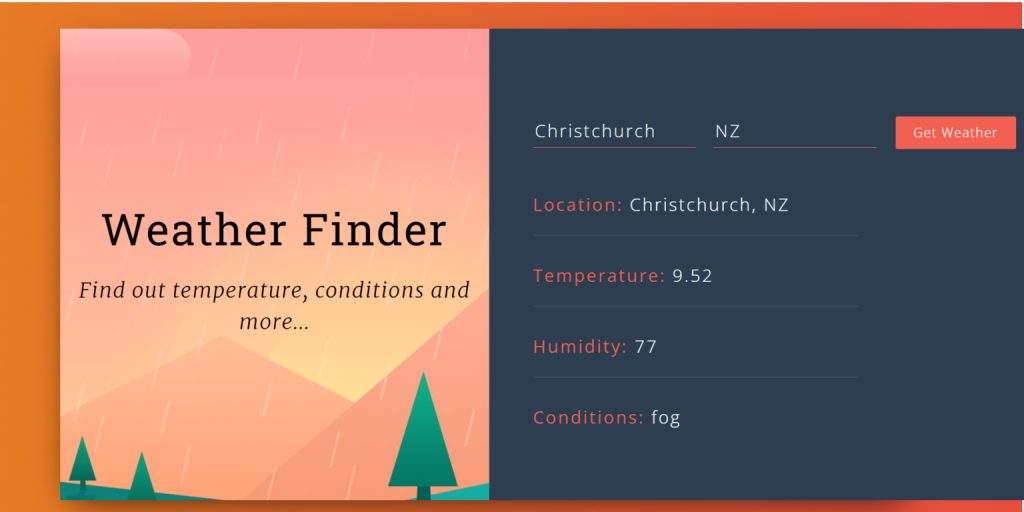
Screenshot of Weather App Using React Bootstrap OpenWeatherMap API