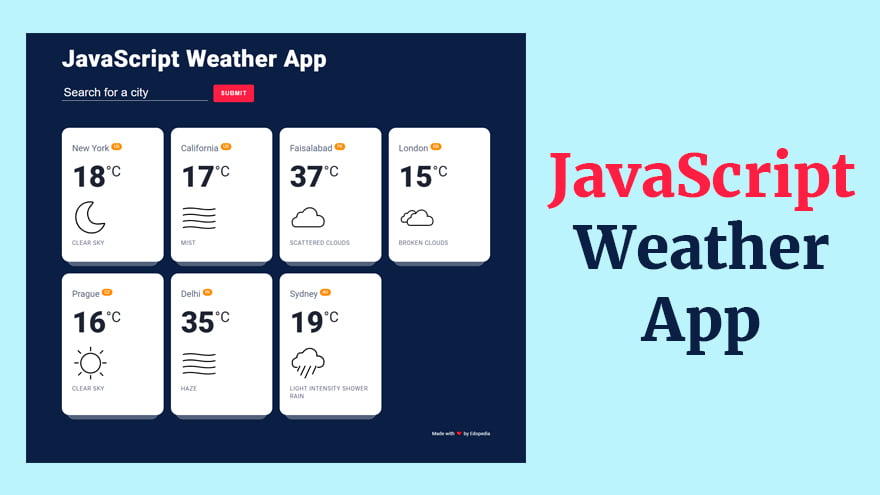
Today, I will teach you how to make a JavaScript Weather App with custom icons using OpenWeather API. The complete source code of this tutorial is given below. So, you can simply download it and try it yourself.
Before writing any code, you need to get a free API key for your application from the OpenWeather API website.
<!DOCTYPE html>
<html>
    <head>
        <title>JavaScript Weather App</title>
        <meta charset="UTF-8">
        <link rel="stylsheet" href="https://fonts.googleapis.com/css?family=Roboto:300,400,700&display=swap"/>
        <link type="text/css" rel="stylesheet" href="./style.css" />
    </head>
    <body>
        <div class="api">
            <div class="container">🌞 This demo needs an OpenWeather API key to work. <a target="_blank" href="https://home.openweathermap.org/users/sign_up">Get yours here for free!</a>
            </div>
        </div>
        <section class="top-banner">
            <div class="container">
                <h1 class="heading">JavaScript Weather App</h1>
                <form>
                    <input type="text" placeholder="Search for a city" autofocus>
                    <button type="submit">SUBMIT</button>
                    <span class="msg"></span>
                </form>
            </div>
        </section>
        <section class="ajax-section">
            <div class="container">
                <ul class="cities"></ul>
            </div>
        </section>
        <footer class="page-footer">
            <div class="container">
                <small>Made with <span>❤️</span> by <a href="https://www.edopedia.com/" target="_blank">Edopedia</a>
                </small>
            </div>
        </footer>

        <script src="./script.js"></script>
    </body>
</html>/* RESET STYLES
–––––––––––––––––––––––––––––––––––––––––––––––––– */:root {
--bg_main: #0a1f44;
--text_light: #fff;
--text_med: #53627c;
--text_dark: #1e2432;
--red: #ff1e42;
--darkred: #c3112d;
--orange: #ff8c00;
}
* {
margin: 0;
padding: 0;
box-sizing: border-box;
font-weight: normal;
}
a {
color: inherit;
text-decoration: none;
}
button {
cursor: pointer;
}
input {
-webkit-appearance: none;
}
button,
input {
border: none;
background: none;
outline: none;
color: inherit;
}
img {
display: block;
max-width: 100%;
height: auto;
}
ul {
list-style: none;
}
body {
font: 1rem/1.3 "Roboto", sans-serif;
background: var(--bg_main);
color: var(--text_dark);
padding: 70px;
}
.container {
width: 100%;
max-width: 1200px;
margin: 0 auto;
padding: 0 15px;
}
/* SECTION #1
–––––––––––––––––––––––––––––––––––––––––––––––––– */ .top-banner {
color: var(--text_light);
}
.heading {
font-weight: bold;
font-size: 4rem;
letter-spacing: 0.02em;
padding: 0 0 30px 0;
}
.top-banner form {
position: relative;
display: flex;
align-items: center;
}
.top-banner form input {
font-size: 2rem;
height: 40px;
padding: 5px 5px 10px;
border-bottom: 1px solid;
}
.top-banner form input::placeholder {
color: currentColor;
}
.top-banner form button {
font-size: 1rem;
font-weight: bold;
letter-spacing: 0.1em;
padding: 15px 20px;
margin-left: 15px;
border-radius: 5px;
background: var(--red);
transition: background 0.3s ease-in-out;
}
.top-banner form button:hover {
background: var(--darkred);
}
.top-banner form .msg {
position: absolute;
bottom: -40px;
left: 0;
max-width: 450px;
min-height: 40px;
}
/* SECTION #2
–––––––––––––––––––––––––––––––––––––––––––––––––– */ .ajax-section {
margin: 70px 0 20px;
}
.ajax-section .cities {
display: grid;
grid-gap: 32px 20px;
grid-template-columns: repeat(4, 1fr);
}
.ajax-section .city {
position: relative;
padding: 40px 10%;
border-radius: 20px;
background: var(--text_light);
color: var(--text_med);
}
.ajax-section .city::after {
content: '';
width: 90%;
height: 50px;
position: absolute;
bottom: -12px;
left: 5%;
z-index: -1;
opacity: 0.3;
border-radius: 20px;
background: var(--text_light);
}
.ajax-section figcaption {
margin-top: 10px;
text-transform: uppercase;
letter-spacing: 0.05em;
}
.ajax-section .city-temp {
font-size: 5rem;
font-weight: bold;
margin-top: 10px;
color: var(--text_dark);
}
.ajax-section .city sup {
font-size: 0.5em;
}
.ajax-section .city-name sup {
padding: 0.2em 0.6em;
border-radius: 30px;
color: var(--text_light);
background: var(--orange);
}
.ajax-section .city-icon {
margin-top: 10px;
width: 100px;
height: 100px;
}
/* FOOTER
–––––––––––––––––––––––––––––––––––––––––––––––––– */ .page-footer {
text-align: right;
font-size: 1rem;
color: var(--text_light);
margin-top: 40px;
}
.page-footer span {
color: var(--red);
}
/* MQ
–––––––––––––––––––––––––––––––––––––––––––––––––– */ @media screen and (max-width: 1000px) {
body {
padding: 30px;
}
.ajax-section .cities {
grid-template-columns: repeat(3, 1fr);
}
}
@media screen and (max-width: 700px) {
.heading,
.ajax-section .city-temp {
font-size: 3rem;
}
.ajax-section {
margin-top: 20px;
}
.top-banner form {
flex-direction: column;
align-items: flex-start;
}
.top-banner form input,
.top-banner form button {
width: 100%;
}
.top-banner form button {
margin: 20px 0 0 0;
}
.top-banner form .msg {
position: static;
max-width: none;
min-height: 0;
margin-top: 10px;
}
.ajax-section .cities {
grid-template-columns: repeat(2, 1fr);
}
}
@media screen and (max-width: 500px) {
body {
padding: 15px;
}
.ajax-section .cities {
grid-template-columns: repeat(1, 1fr);
}
}
/* API Key banner
–––––––––––––––––––––––––––––––––––––––––––––––––– */ .api {
background: #fffbbc;
position: fixed;
top: 0;
left: 0;
width: 100%;
padding: 10px
}
.api a {
text-decoration: underline;
}
.api a:hover {
text-decoration: none;
}/*SEARCH BY USING A CITY NAME (e.g. athens) OR A COMMA-SEPARATED CITY NAME ALONG WITH THE COUNTRY CODE (e.g. athens,gr)*/const form = document.querySelector(".top-banner form");
const input = document.querySelector(".top-banner input");
const msg = document.querySelector(".top-banner .msg");
const list = document.querySelector(".ajax-section .cities");
/* SUBSCRIBE HERE FOR API KEY: https://home.openweathermap.org/users/sign_up */const apiKey = "98558fe02a2a5ba623233fec1ca91076";
form.addEventListener("submit", e => {
e.preventDefault();
let inputVal = input.value;
//check if there's already a city
const listItems = list.querySelectorAll(".ajax-section .city");
const listItemsArray = Array.from(listItems);
if (listItemsArray.length > 0) {
const filteredArray = listItemsArray.filter(el => {
let content = "";
//athens,gr
if (inputVal.includes(",")) {
//athens,grrrrrr->invalid country code, so we keep only the first part of inputVal
if (inputVal.split(",")[1].length > 2) {
inputVal = inputVal.split(",")[0];
content = el
.querySelector(".city-name span")
.textContent.toLowerCase();
} else {
content = el.querySelector(".city-name").dataset.name.toLowerCase();
}
} else {
//athens
content = el.querySelector(".city-name span").textContent.toLowerCase();
}
return content == inputVal.toLowerCase();
});
if (filteredArray.length > 0) {
msg.textContent = `You already know the weather for ${
filteredArray[0].querySelector(".city-name span").textContent
} ...otherwise be more specific by providing the country code as well 😉`;
form.reset();
input.focus();
return;
}
}
//ajax here
const url = `https://api.openweathermap.org/data/2.5/weather?q=${inputVal}&appid=${apiKey}&units=metric`;
fetch(url)
.then(response => response.json())
.then(data => {
const { main, name, sys, weather } = data;
const icon = `https://s3-us-west-2.amazonaws.com/s.cdpn.io/162656/${
weather[0]["icon"]
}.svg`;
const li = document.createElement("li");
li.classList.add("city");
const markup = `
<h2 class="city-name" data-name="${name},${sys.country}">
<span>${name}</span>
<sup>${sys.country}</sup>
</h2>
<div class="city-temp">${Math.round(main.temp)}<sup>°C</sup></div>
<figure>
<img class="city-icon" src="${icon}" alt="${
weather[0]["description"]
}">
<figcaption>${weather[0]["description"]}</figcaption>
</figure>
`;
li.innerHTML = markup;
list.appendChild(li);
})
.catch(() => {
msg.textContent = "Please search for a valid city 😩";
});
msg.textContent = "";
form.reset();
input.focus();
});If you have been searching for the right note-taking or knowledge management app, you have…
Looking for AnyType alternatives? You're not alone. AnyType has gained popularity as a privacy-focused, local-first…
Notion is a popular all-in-one workspace, but many users seek alternatives for different needs (free…
Logseq is a beloved tool in the personal knowledge management (PKM) community. It's free, open-source,…
Looking for a Webshare alternative? You're not alone. Webshare is a popular proxy service with…
Docker changed software development forever. It made containers accessible, gave developers a simple workflow, and…


