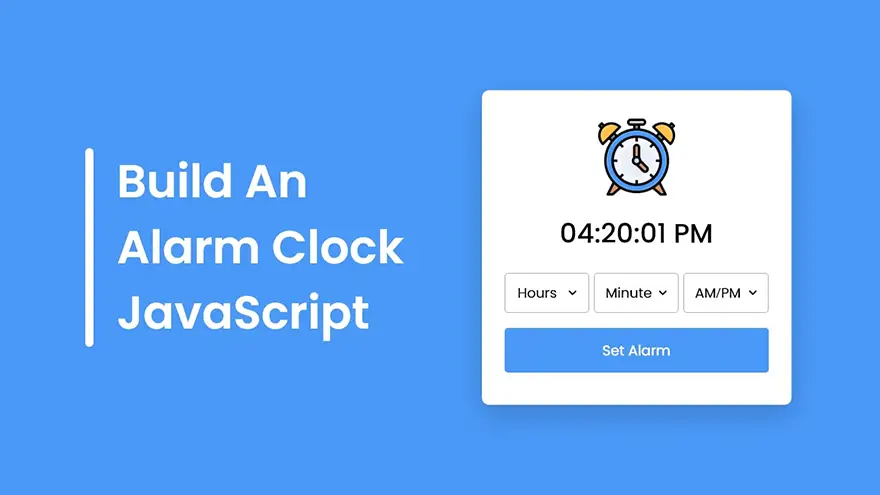
In this tutorial, I will teach you how to create a Digital Alarm Clock with Ringtone using HTML5, CSS3, and JavaScript. The complete source code of this JavaScript alarm clock app is given below.
You can download the full source code (including images and ringtone) of this JavaScript alarm clock app at the end of this article.
<!DOCTYPE html>
<html lang="en" dir="ltr">
  <head>
    <meta charset="utf-8">
    <title>Alarm Clock in JavaScript</title>
    <link rel="stylesheet" href="style.css">
    <meta name="viewport" content="width=device-width, initial-scale=1.0">
  </head>
  <body>
    <div class="wrapper">
      <img src="./files/clock.svg" alt="clock">
      <h1>00:00:00 PM</h1>
      <div class="content">
        <div class="column">
          <select>
            <option value="Hour" selected disabled hidden>Hour</option>
          </select>
        </div>
        <div class="column">
          <select>
            <option value="Minute" selected disabled hidden>Minute</option>
          </select>
        </div>
        <div class="column">
          <select>
            <option value="AM/PM" selected disabled hidden>AM/PM</option>
          </select>
        </div>
      </div>
      <button>Set Alarm</button>
    </div>

    <script src="script.js"></script>

  </body>
</html>const currentTime = document.querySelector("h1"),
content = document.querySelector(".content"),
selectMenu = document.querySelectorAll("select"),
setAlarmBtn = document.querySelector("button");
let alarmTime, isAlarmSet,
ringtone = new Audio("./files/ringtone.mp3");
for (let i = 12; i > 0; i--) {
i = i < 10 ? `0${i}` : i;
let option = `<option value="${i}">${i}</option>`;
selectMenu[0].firstElementChild.insertAdjacentHTML("afterend", option);
}
for (let i = 59; i >= 0; i--) {
i = i < 10 ? `0${i}` : i;
let option = `<option value="${i}">${i}</option>`;
selectMenu[1].firstElementChild.insertAdjacentHTML("afterend", option);
}
for (let i = 2; i > 0; i--) {
let ampm = i == 1 ? "AM" : "PM";
let option = `<option value="${ampm}">${ampm}</option>`;
selectMenu[2].firstElementChild.insertAdjacentHTML("afterend", option);
}
setInterval(() => {
let date = new Date(),
h = date.getHours(),
m = date.getMinutes(),
s = date.getSeconds(),
ampm = "AM";
if(h >= 12) {
h = h - 12;
ampm = "PM";
}
h = h == 0 ? h = 12 : h;
h = h < 10 ? "0" + h : h;
m = m < 10 ? "0" + m : m;
s = s < 10 ? "0" + s : s;
currentTime.innerText = `${h}:${m}:${s} ${ampm}`;
if (alarmTime === `${h}:${m} ${ampm}`) {
ringtone.play();
ringtone.loop = true;
}
});
function setAlarm() {
if (isAlarmSet) {
alarmTime = "";
ringtone.pause();
content.classList.remove("disable");
setAlarmBtn.innerText = "Set Alarm";
return isAlarmSet = false;
}
let time = `${selectMenu[0].value}:${selectMenu[1].value} ${selectMenu[2].value}`;
if (time.includes("Hour") || time.includes("Minute") || time.includes("AM/PM")) {
return alert("Please, select a valid time to set Alarm!");
}
alarmTime = time;
isAlarmSet = true;
content.classList.add("disable");
setAlarmBtn.innerText = "Clear Alarm";
}
setAlarmBtn.addEventListener("click", setAlarm);/* Import Google font - Poppins */@import url('https://fonts.googleapis.com/css2?family=Poppins:wght@400;500;600&display=swap');
*{
margin: 0;
padding: 0;
box-sizing: border-box;
font-family: 'Poppins', sans-serif;
}
body, .wrapper, .content{
display: flex;
align-items: center;
justify-content: center;
}
body{
padding: 0 10px;
min-height: 100vh;
background: #4A98F7;
}
.wrapper{
width: 440px;
padding: 30px 30px 38px;
background: #fff;
border-radius: 10px;
flex-direction: column;
box-shadow: 0 10px 25px rgba(0,0,0,0.1);
}
.wrapper img{
max-width: 103px;
}
.wrapper h1{
font-size: 38px;
font-weight: 500;
margin: 30px 0;
}
.wrapper .content{
width: 100%;
justify-content: space-between;
}
.content.disable{
cursor: no-drop;
}
.content .column{
padding: 0 10px;
border-radius: 5px;
border: 1px solid #bfbfbf;
width: calc(100% / 3 - 5px);
}
.content.disable .column{
opacity: 0.6;
pointer-events: none;
}
.column select{
width: 100%;
height: 53px;
border: none;
outline: none;
background: none;
font-size: 19px;
}
.wrapper button{
width: 100%;
border: none;
outline: none;
color: #fff;
cursor: pointer;
font-size: 20px;
padding: 17px 0;
margin-top: 20px;
border-radius: 5px;
background: #4A98F7;
}If you have been searching for the right note-taking or knowledge management app, you have…
Looking for AnyType alternatives? You're not alone. AnyType has gained popularity as a privacy-focused, local-first…
Notion is a popular all-in-one workspace, but many users seek alternatives for different needs (free…
Logseq is a beloved tool in the personal knowledge management (PKM) community. It's free, open-source,…
Looking for a Webshare alternative? You're not alone. Webshare is a popular proxy service with…
Docker changed software development forever. It made containers accessible, gave developers a simple workflow, and…