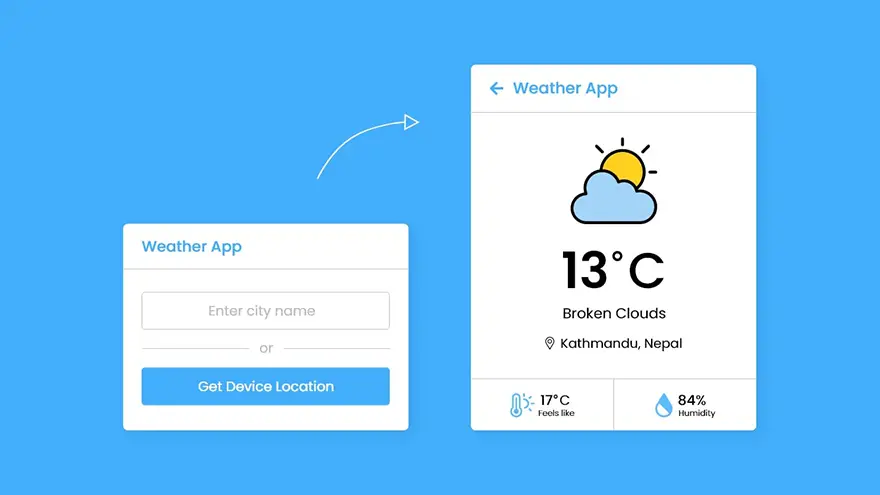
In this tutorial, I will teach you how to create a weather app using HTML5, CSS3, and JavaScript. The complete source code of this JavaScript Weather App is given below.
You can download the full source code (including images) of this JavaScript Weather app at the end of this article.
<!DOCTYPE html>
<html lang="en" dir="ltr">
  <head>
    <meta charset="utf-8">
    <title>Weather App in JavaScript</title>
    <link rel="stylesheet" href="style.css">
    <meta name="viewport" content="width=device-width, initial-scale=1.0">
    <!-- Linking BoxIcon for Icon -->
    <link href='https://unpkg.com/boxicons@2.0.9/css/boxicons.min.css' rel='stylesheet'>
  </head>
  <body>
    <div class="wrapper">
      <header><i class='bx bx-left-arrow-alt'></i>Weather App</header>
      <section class="input-part">
        <p class="info-txt"></p>
        <div class="content">
          <input type="text" spellcheck="false" placeholder="Enter city name" required>
          <div class="separator"></div>
          <button>Get Device Location</button>
        </div>
      </section>
      <section class="weather-part">
        <img src="" alt="Weather Icon">
        <div class="temp">
          <span class="numb">_</span>
          <span class="deg">°</span>C
        </div>
        <div class="weather">_ _</div>
        <div class="location">
          <i class='bx bx-map'></i>
          <span>_, _</span>
        </div>
        <div class="bottom-details">
          <div class="column feels">
            <i class='bx bxs-thermometer'></i>
            <div class="details">
              <div class="temp">
                <span class="numb-2">_</span>
                <span class="deg">°</span>C
              </div>
              <p>Feels like</p>
            </div>
          </div>
          <div class="column humidity">
            <i class='bx bxs-droplet-half'></i>
            <div class="details">
              <span>_</span>
              <p>Humidity</p>
            </div>
          </div>
        </div>
      </section>
    </div>

    <script src="script.js"></script>

  </body>
</html>
const wrapper = document.querySelector(".wrapper"),
inputPart = document.querySelector(".input-part"),
infoTxt = inputPart.querySelector(".info-txt"),
inputField = inputPart.querySelector("input"),
locationBtn = inputPart.querySelector("button"),
weatherPart = wrapper.querySelector(".weather-part"),
wIcon = weatherPart.querySelector("img"),
arrowBack = wrapper.querySelector("header i");

let api;

inputField.addEventListener("keyup", e =>{
    // if user pressed enter btn and input value is not empty
    if(e.key == "Enter" && inputField.value != ""){
        requestApi(inputField.value);
    }
});

locationBtn.addEventListener("click", () =>{
    if(navigator.geolocation){ // if browser support geolocation api
        navigator.geolocation.getCurrentPosition(onSuccess, onError);
    }else{
        alert("Your browser not support geolocation api");
    }
});

function requestApi(city){
    api = `https://api.openweathermap.org/data/2.5/weather?q=${city}&units=metric&appid=your_api_key`;
    fetchData();
}

function onSuccess(position){
    const {latitude, longitude} = position.coords; // getting lat and lon of the user device from coords obj
    api = `https://api.openweathermap.org/data/2.5/weather?lat=${latitude}&lon=${longitude}&units=metric&appid=your_api_key`;
    fetchData();
}

function onError(error){
    // if any error occur while getting user location then we'll show it in infoText
    infoTxt.innerText = error.message;
    infoTxt.classList.add("error");
}

function fetchData(){
    infoTxt.innerText = "Getting weather details...";
    infoTxt.classList.add("pending");
    // getting api response and returning it with parsing into js obj and in another
    // then function calling weatherDetails function with passing api result as an argument
    fetch(api).then(res => res.json()).then(result => weatherDetails(result)).catch(() =>{
        infoTxt.innerText = "Something went wrong";
        infoTxt.classList.replace("pending", "error");
    });
}

function weatherDetails(info){
    if(info.cod == "404"){ // if user entered city name isn't valid
        infoTxt.classList.replace("pending", "error");
        infoTxt.innerText = `${inputField.value} isn't a valid city name`;
    }else{
        //getting required properties value from the whole weather information
        const city = info.name;
        const country = info.sys.country;
        const {description, id} = info.weather[0];
        const {temp, feels_like, humidity} = info.main;

        // using custom weather icon according to the id which api gives to us
        if(id == 800){
            wIcon.src = "icons/clear.svg";
        }else if(id >= 200 && id <= 232){
            wIcon.src = "icons/storm.svg";
        }else if(id >= 600 && id <= 622){
            wIcon.src = "icons/snow.svg";
        }else if(id >= 701 && id <= 781){
            wIcon.src = "icons/haze.svg";
        }else if(id >= 801 && id <= 804){
            wIcon.src = "icons/cloud.svg";
        }else if((id >= 500 && id <= 531) || (id >= 300 && id <= 321)){
            wIcon.src = "icons/rain.svg";
        }

        //passing a particular weather info to a particular element
        weatherPart.querySelector(".temp .numb").innerText = Math.floor(temp);
        weatherPart.querySelector(".weather").innerText = description;
        weatherPart.querySelector(".location span").innerText = `${city}, ${country}`;
        weatherPart.querySelector(".temp .numb-2").innerText = Math.floor(feels_like);
        weatherPart.querySelector(".humidity span").innerText = `${humidity}%`;
        infoTxt.classList.remove("pending", "error");
        infoTxt.innerText = "";
        inputField.value = "";
        wrapper.classList.add("active");
    }
}

arrowBack.addEventListener("click", ()=>{
    wrapper.classList.remove("active");
});
/* Import Google Font - Poppins */@import url('https://fonts.googleapis.com/css2?family=Poppins:wght@400;500;600;700&display=swap');
*{
  margin: 0;
  padding: 0;
  box-sizing: border-box;
  font-family: 'Poppins', sans-serif;
}
body{
  display: flex;
  align-items: center;
  justify-content: center;
  min-height: 100vh;
  background: #43AFFC;
}
::selection{
  color: #fff;
  background: #43AFFC;
}
.wrapper{
  width: 400px;
  background: #fff;
  border-radius: 7px;
  box-shadow: 7px 7px 20px rgba(0, 0, 0, 0.05);
}
.wrapper header{
  display: flex;
  font-size: 21px;
  font-weight: 500;
  color: #43AFFC;
  padding: 16px 15px;
  align-items: center;
  border-bottom: 1px solid #ccc;
}
header i{
  font-size: 0em;
  cursor: pointer;
  margin-right: 8px;
}
.wrapper.active header i{
  margin-left: 5px;
  font-size: 30px;
}
.wrapper .input-part{
  margin: 20px 25px 30px;
}
.wrapper.active .input-part{
  display: none;
}
.input-part .info-txt{
  display: none;
  font-size: 17px;
  text-align: center;
  padding: 12px 10px;
  border-radius: 7px;
  margin-bottom: 15px;
}
.input-part .info-txt.error{
  color: #721c24;
  display: block;
  background: #f8d7da;
  border: 1px solid #f5c6cb;
}
.input-part .info-txt.pending{
  color: #0c5460;
  display: block;
  background: #d1ecf1;
  border: 1px solid #bee5eb;
}
.input-part :where(input, button){
  width: 100%;
  height: 55px;
  border: none;
  outline: none;
  font-size: 18px;
  border-radius: 7px;
}
.input-part input{
  text-align: center;
  padding: 0 15px;
  border: 1px solid #ccc;
}
.input-part input:is(:focus, :valid){
  border: 2px solid #43AFFC;
}
.input-part input::placeholder{
  color: #bfbfbf;
}
.input-part .separator{
  height: 1px;
  width: 100%;
  margin: 25px 0;
  background: #ccc;
  position: relative;
  display: flex;
  align-items: center;
  justify-content: center;
}
.separator::before{
  content: "or";
  color: #b3b3b3;
  font-size: 19px;
  padding: 0 15px;
  background: #fff;
}
.input-part button{
  color: #fff;
  cursor: pointer;
  background: #43AFFC;
  transition: 0.3s ease;
}
.input-part button:hover{
  background: #1d9ffc;
}

.wrapper .weather-part{
  display: none;
  margin: 30px 0 0;
  align-items: center;
  justify-content: center;
  flex-direction: column;
}
.wrapper.active .weather-part{
  display: flex;
}
.weather-part img{
  max-width: 125px;
}
.weather-part .temp{
  display: flex;
  font-weight: 500;
  font-size: 72px;
}
.weather-part .temp .numb{
  font-weight: 600;
}
.weather-part .temp .deg{
  font-size: 40px;
  display: block;
  margin: 10px 5px 0 0;
}
.weather-part .weather{
  font-size: 21px;
  text-align: center;
  margin: -5px 20px 15px;
}
.weather-part .location{
  display: flex;
  font-size: 19px;
  padding: 0 20px;
  text-align: center;
  margin-bottom: 30px;
  align-items: flex-start;
}
.location i{
  font-size: 22px;
  margin: 4px 5px 0 0;
}
.weather-part .bottom-details{
  display: flex;
  width: 100%;
  justify-content: space-between;
  border-top: 1px solid #ccc;
}
.bottom-details .column{
  display: flex;
  width: 100%;
  padding: 15px 0;
  align-items: center;
  justify-content: center;
}
.column i{
  color: #5DBBFF;
  font-size: 40px;
}
.column.humidity{
  border-left: 1px solid #ccc;
}
.column .details{
  margin-left: 3px;
}
.details .temp, .humidity span{
  font-size: 18px;
  font-weight: 500;
  margin-top: -3px;
}
.details .temp .deg{
  margin: 0;
  font-size: 17px;
  padding: 0 2px 0 1px;
}
.column .details p{
  font-size: 14px;
  margin-top: -6px;
}
.humidity i{
  font-size: 37px;
}Google Chrome has dominated web browsing for over a decade with 71.77% global market share.…
Perplexity just made its AI-powered browser, Comet, completely free for everyone on October 2, 2025.…
You've probably heard about ChatGPT Atlas, OpenAI's new AI-powered browser that launched on October 21,…
Perplexity Comet became free for everyone on October 2, 2025, bringing research-focused AI browsing to…
ChatGPT Atlas launched on October 21, 2025, but it's only available on macOS. If you're…
Two AI browsers just entered the ring in October 2025, and they're both fighting for…
